Traditionally, fire safety inspections were managed with clipboards, paper forms, and filing cabinets full of certificates and old citations. But today, businesses in the fire protection industry need something smarter, faster, and much more reliable. This is where software steps in. The right software doesn't just digitize your paperwork, it transforms the way you schedule inspections and keep track of compliance, streamlining your fire inspection process from beginning to end.
As a leader in this space, Uptick has been trusted by hundreds of leading fire protection businesses to streamline operations, increase efficiency, and simplify the day-to-day.
Fire safety software explained
Fire safety software takes care of the operational tasks – like scheduling routine sprinkler inspections, generating compliance reports for building owners, and preparing compliance documentation for fire safety systems and equipment – that keep fire protection businesses running smoothly. Uptick is designed to eliminate the friction of these tasks by making sure that all assets are easily located, inspected, and tracked.
The aim of fire safety software is to replace manual processes with automated workflows, mobile data collection, and centralized record-keeping, improving operational efficiency and ensuring that businesses stay compliant.
Most softwares have mobile apps that let technicians complete on-site inspections, take photos of equipment conditions, and record test results on the go. This real-time data collection means office staff can monitor job progress, find immediate issues, and respond to client questions without waiting for paperwork to arrive.
The best systems? They also automate the repetitive tasks that consume hours each week. We’re talking about scheduling recurring inspections based on NFPA requirements, generating certificates, keeping track of equipment maintenance, and sending reminder notifications to clients.
How different fire safety softwares work
Like many other softwares, fire safety software isn't one-size-fits-all. Different platforms offer different benefits and serve different purposes. Understanding these differences can help you decide what is most important to your business.
Fire inspection software
These focus specifically on conducting and documenting inspections, allowing technicians to seamlessly create digital checklists, mark deficiencies, capture photos, and create inspection reports. This type of software can be most beneficial for businesses that primarily handle routine inspections of sprinklers, fire alarms, extinguishers, and emergency lighting.
Fire protection service software
Taking a broader approach, these manage the complete service lifecycle – from initial client contact to scheduling, field work, invoicing, and follow-up maintenance. Generally, these platforms have CRM capabilities and allow for work order management, inventory tracking, and integration with third-party finance or accounting systems.
Fire protection field service software
These systems have a huge focus on the operational aspects of running a fire protection business. They prioritize things like GPS tracking, real-time communication between field and office teams, technician scheduling, and mobile inspection forms. They're built for companies who have multiple jobs sites and need efficiency and coordination across all.
Fire maintenance software
These systems are best for tracking equipment maintenance schedules, asset lifecycles, and service histories. They can automate maintenance reminders and maintain detailed records for every piece of fire protection equipment your business services. This is most beneficial for businesses that need to make sure that nothing falls through the cracks.
Fire safety management software
If you’re looking for comprehensive compliance management, beyond just inspections, these platforms are for you. They help businesses track regulatory requirements, manage training records, maintain certification documentation, and ensure ongoing compliance with local fire codes and NFPA standards.
Fire safety business software
These kinds of software offer full picture business management: financial operations, project management, customer relations, and compliance tracking. These enterprise solutions are best for businesses who are aiming to replace multiple separate systems with an all-in-one platform.
The key? Understanding which capabilities matter most for your operation.
Features that the best fire inspection softwares offer
Mobile functionality
Technicians need apps that work offline – in basements and buildings with bad reception – so mobile functionality is essential. Uptick’s mobile app is built for the field, helping technicians log data, access information, and capture photos and client signatures without a connection – then syncing it automatically once they’re back online.
Inspection forms
If built correctly, this can save a lot of time. The best platforms have pre-configured checklists for common equipment types. Uptick’s ready-to-go forms are customizable, letting you tailor them to specific client needs.
Tracking and reporting compliance
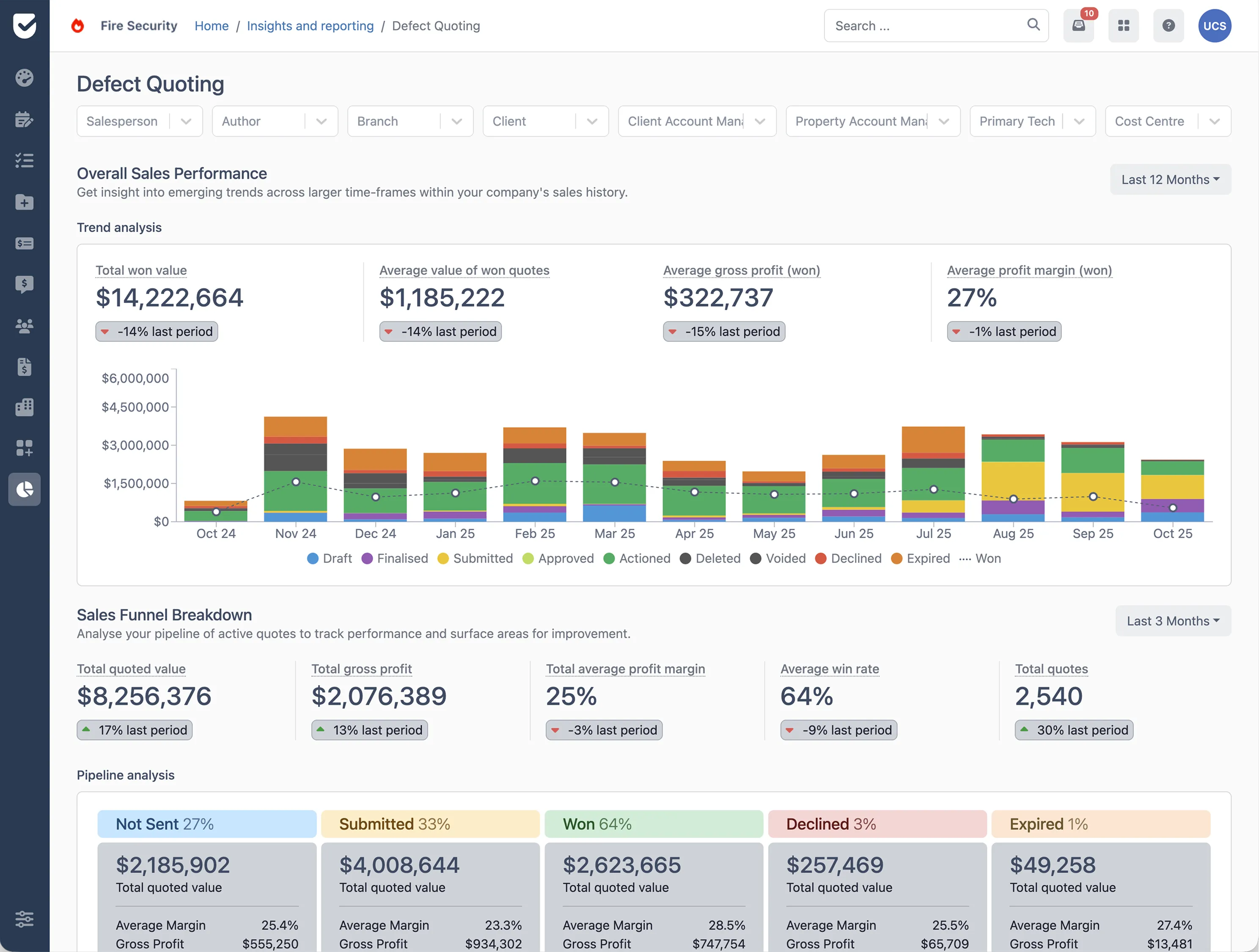
This is one of the main differences between adequate software and excellent software. Uptick’s insights and reporting engine helps you generate reports and see your most important metrics across sales, operations, finance, and the field, ensuring you are always audit-ready.
Tools for scheduling and dispatch
This enhances the efficiency of your technicians. Good software thinks about the locations, skills, and availability of your technician when assigning jobs; but great software optimizes routes to minimize drive time and automatically adjusts schedules when emergencies come up.
Generating reports
After finishing an inspection, technicians should be able to quickly generate branded reports on-site and email them directly to clients. This is both efficient and professional. Reports should include photos, deficiency details, and clear recommendations, and shouldn’t need office staff to compile information from multiple sources.
Tracking assets and equipment
As you grow your client base, this becomes more and more important. Your ideal software should be able to store detailed histories for every piece of equipment you service including the date it was installed, maintenance records, parts that have been replaced, test results, and warranty information. This will help you make better decisions and easily navigate audits or liability questions.
Integration capabilities
How well does the fire safety software fit into your existing technology? Does it sync with your CRM so you can keep a history of your client communications? Does it connect with your accounting system so that duplicate data entry is never an issue? Does it export data to other tools your business uses? These questions are critical to help you work faster and smarter.
Deficiency management
This helps you track identified issues – from discovery through to resolution. The aim is to be able to easily document issues with photos and descriptions, assign actions to the right team members, and mark it off when it has been completed. We call this closed-loop tracking, and it means nothing gets forgotten.
Customer portals
With transparency comes trust. Giving customers access to Uptick’s customer portal will help you deliver best in class service and demonstrate your value, reducing phone calls to the office.
9 simple steps to help you find the right fire safety software for your business
To choose the right software you must assess your actual needs, not just choose tools that sound impressive.
- Name your main pain point
Drowning in paperwork? Losing track of compliance deadlines? Struggling to keep technicians scheduled efficiently? Missing revenue because things are falling through cracks? Choose software that directly addresses your biggest operational challenge. - Name your business focus
Every companies’ needs are different. If you primarily handle routine inspections, you’ll have different software needs than those doing complex installations or emergency repairs—a platform optimized for fast recurring inspections could lack the project management tools needed for multi-week installation jobs. - Think about the necessary learning
Sure, hundreds of cool features is impressive, but does your team have the time to learn and utilize them all? Often, a simpler platform means that your entire team will actually use it. Don’t pay for something your whole team won’t use. - Think about mobile reliability
As mentioned above, mobile reliability and functionality can be critical—is that the case for your team? Download the mobile app before committing and test it in different scenarios and without connection. Can you complete an entire inspection offline? Does data sync reliably when connection returns? - Assess integration requirements
Make a list of other tools your business relies on – this could be anything from accounting and CRM platforms to inventory management software. Designed to fit into your existing tech stack, Uptick seamlessly integrates with tools like QuickBooks and Xero to ensure your data flows seamlessly from a completed inspection to an outgoing invoice. - Consider whether you can easily scale
As your business grows, will the platform support it? What happens when you add more technicians, service more clients, or expand into new service areas? What do the upgrade paths and pricing changes look like? Ideally you’d like to avoid switching platforms in a few years. - Examine the pricing model carefully
Beyond the monthly subscription, what are the true costs? Are there implementation fees, training charges, or costs to add users? Will the platform charge you to migrate data? This is the point where you should get specific numbers and compare them to other softwares. - Read reviews from actual users
What do technicians have to say about the mobile app? Is customer support responsive? Are updates frequent and helpful, or does the platform feel stagnant? Try to look for reviews from businesses that are a similar size to yours, and service the same needs. - Make sure you have demos and trial periods
It’s highly likely that platforms offer free demonstrations and free trials. This is the perfect opportunity for you to test the software and see how it fits into your workflow. Try completing real inspections, generating actual reports, and performing the daily tasks your team handles. If the software doesn’t feel right during a trial, it'll likely get worse in daily operations.
Get answers: These are the questions to ask before you buy
Certain questions can reveal whether software providers understand fire protection businesses or whether they just want to sell generic inspection tools.
Compliance:
- Which specific NFPA standards does your platform support?
- How do you handle updates when standards change?
- Can I see sample reports for sprinkler systems, fire alarms, and extinguishers?
Mobile:
- What happens if I complete an inspection in a building with no cell service?
- How much data can the app store offline?
- What occurs if two technicians edit the same job simultaneously?
Customer support:
- What support is included in the base price?
- How quickly do you respond to technical issues?
- Can I speak with someone immediately if our system goes down during business hours?
- Is training included?
Data:
- Who owns the data I enter into your system?
- Can I export all my information if I decide to switch platforms? In what format?
- Is there a fee for exporting or migrating data?
Customization:
- Can I modify inspection templates for specific client requirements?
- Can I add custom fields to track information unique to my business?
- Are there limits on customization?
Reporting:
- Can I customize report layouts to match my branding?
- Can I automatically send clients automatic reports?
- Can I schedule recurring reports for compliance tracking?
Integration:
- Does your platform integrate with QuickBooks/Xero/other accounting software?
- What CRM systems does it integrate with?
- Are these native integrations or do they require third-party tools?
Pricing:
- What's the total cost for my team size and usage?
- Are there setup fees? What happens to pricing when I add technicians?
- When you update features, does pricing change?
Choose the right software, improve your business operations
Ready to see how Uptick can transform your operations?